| ||||||||||||||
 
FileMove Professional 2.5 |
| Explanation: | |
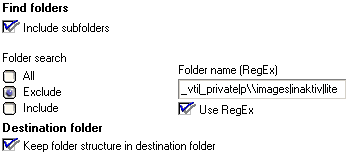
| _vti | finds the FrontPage folders |
| | | stands for 'or' |
| _private | finds the folder with this name |
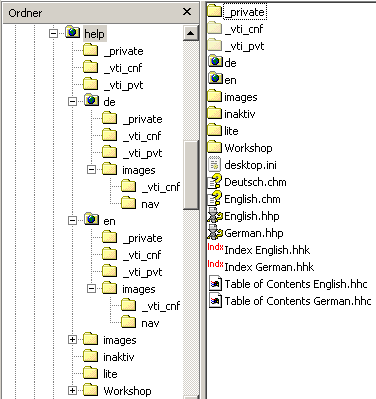
| p\\images | this images folder is defined that way to avoid the exclusion of the other same named folders 'images' under 'help\en\images' and 'help\de\images'. p\\images finds only 'help\images'. |
| inaktiv|lite | These are the other working folder not used to run the help pages. |
As you see the folder 'Workshop' was not excluded because it has none of the files with the extensions which will be included.
As included file extensions are defined:

The web page contains files with the extensions htm, html and gif. (You will find the same extensions in FrontPages _vti* folders but these are configuration files)
All other settings in the edit window are disabled by default.
After running the job once the destination folder and its structure looks like this:
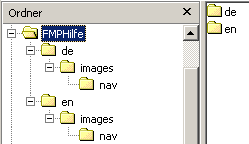
Voila! All the web pages and images are there with none of the unused files and folders.
If this job is exported to use it again and again then the option
'overwrite existing files' or 'overwrite with newer files' in the sections
'existing files in destination folder' should be selected. This way you
will have always the latest version of the pages after running the job in
the destination folder. Newly added pictures or web pages will be added
automatically and will be included in the search.
If you double click on this file then the Jobber
starts and with only three clicks (one double click on the job file and
one to execute the job) the job is done as many times it is needed.
Synchronization of files
Synchronization can be done with two different jobs. One compares the files in the destination folder and the other compared the files in the source folder from the first job. The synchronization can be fine tuned by the search settings. Select overwrite if files are older in both jobs.
Exclude folders
Finds the user Karl E. Maij and all subfolders except the folder Cookies (and except the subfolders of Cookies) and except the folder real (and except the subfolders of real). The folder 'cookies' or 'real' can be every where in the path below the user <profile>\Karl E. Maij\:
Karl E\. Maij(?!.*cookies|.*real)
Find folder name
^Foldername$
Find a date
^(3[01]|0[1-9]|[12]\d)\/(0[1-9]|1[012])\/\d{4}
Find an Email address
^\w+([\.-]?\w+)*@\w+([\.-]?\w+)*(\.\w{2,})+$
There will be more information about FileMove Pro related RegExes in the coming online FAQ. Check the website www.sitedesign.ch/filemove/pro/ If you figured out a genial pattern and you want to share it with other users then please send it to support@sitedesign.ch
There is more and extended information and examples in the internet see Google.
  |
|

|
SDW Software • Internet and
Desktop Applications |